

Styling emails are always difficult for web designers. You need to be extra careful when designing email templates as clients tend to behave differently on different emails. Some of them prefer non inline templates, whereas some require inline styles and ignore references.
In this blog, I will give you a comprehensive rundown on how to effectively style your email templates with CSS file.
Since the recent upgrade, Magento 1.9.1 now allows you to define inline CSS in a separate file that automatically adds or injects within style attributes of each element. It uses two types of CSS files, a file for injecting inline CSS (“email-inline.css”) and files for non-inline CSS (“email-non-inline.css”) that are configurable.
First, let’s have a look at how to add inline CSS file:
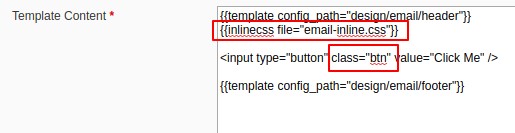
To add inline CSS file make sure your template contains following directive:
{{inlinecss file="email-inline.css"}}
Please note that all email templates contain this directive as it supports standard Magento Fallback hierarchy. An easy way to start can be as follows:
Supported CSS selectors (Reference)
There are few styles which cannot be applied inline rather it requires separate style tag. For these, Magento supports variable {{var non_inline_styles}}, which loads CSS defined in:
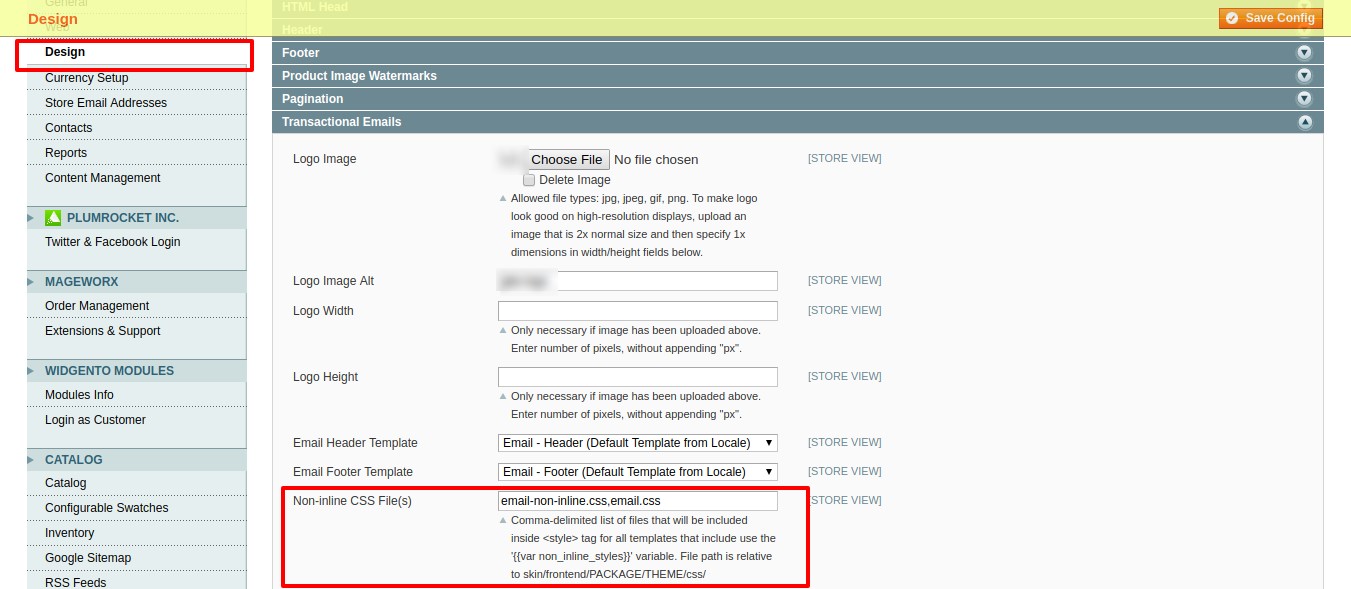
When emails are scheduled and sent using Cron Job, Magento does not consider current theme for store. Therefore, it does not apply CSS from file. To resolve this issue, you must put all these CSS within styles tag. To further avoid duplication, you can copy these within header template so that it is available in all other email templates too.
In a nutshell, you can define 2 types of CSS, “inline” & “non-inline”, both of which can be managed within separate files, in email templates. However, it is essential to note that these files cannot be used when emails are sent using Cron Job.
I hope that you find this blog helpful in organizing your Magento email template with CSS file.
Please feel free to comment or reach out if you have any questions. If you need any help with customizing your Magento or Magento 2 web store, please get in touch with us.

USA408 365 4638

1301 Shoreway Road, Suite 160,
Belmont, CA 94002


COMMENTS ()
Tweet